



How to Choose the Best Class Management Software

Helping children build skills, gain confidence, and discover what they love takes dedication.
When running a youth-oriented gym, studio, or children's activity center, you're building an environment that makes those moments possible.
But registration questions, schedule changes, tuition billing, and parent communications can take time away from supporting students and staff.
The right class management software can lighten that administrative load.
Look for software that connects daily tasks, help families manage registration and payments themselves, and give you useful insights into your business.
On your software journey, this guide will help you:
- Identify the features your activity center needs.
- Test essential everyday workflows during software demos.
- Compare costs, support, and long-term value when choosing a provider.
What Is Class Management Software?
Class management software helps activity centers manage class schedules, registration, tuition, payments, attendance, and customer communications in one platform.
For children’s activity centers, it also needs to support the relationships between families, students, and staff.
Look for industry-specific workflows like:
- Family accounts: Parents or guardians can manage multiple children.
- Enrollment rules: Class eligibility reflects age, gender, and skill requirements.
- Flexible tuition: Billing supports sibling and multiclass discounts. Overrides can be arranged by staff.
- Policy agreements: Families can review and accept required policies online.
- Staff access: Instructors and administrators can access information appropriate to their roles.
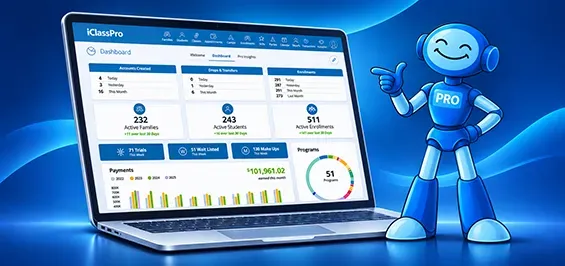
iClassPro brings these capabilities together in one activity center platform to help manage your business. Staff can manage daily operations smoothly while families find classes, enroll children, make payments, and view student progress online.
How to Choose Class Management Software
Choose class management software by defining your enrollment and billing requirements, testing real workflows during demos, comparing total costs, and confirming implementation support.
Most children’s activity centers will want to pay particular attention to family account management, student age and skill requirements, and staff access controls or permissions.
Use these priorities to build your shortlist of providers to evaluate:
- Enrollment and tuition controls that match your programs.
- Convenient registration and account management for families.
- Connected billing, payments, attendance, and communications.
- Reporting that answers practical business questions.
- Clear pricing, training, and ongoing support.
- Features that accommodate your plans for growth.
When Is It Time to Consider New Class Management Software?
Consider new class management software when everyday tasks create recurring delays, errors, or unnecessary follow-up.
Whether you’re choosing your first platform or replacing one, watch for these signs:
- Families need staff help to add children, find classes, view balances, or make payments.
- Staff re-enter family, student, or registration details across platforms like spreadsheets, billing systems, or rosters.
- Tuition changes require repeated manual adjustments.
- Staff struggle to track class openings and enrollment changes.
What Should You Consider When Choosing Class Management Software?
Before comparing providers, identify three workflows you need to improve and three that already work well. Describe what each process needs to accomplish, then ask every provider to demonstrate it using your examples.
Evaluate the steps, staff involvement, and results—not just whether a feature appears on the list.
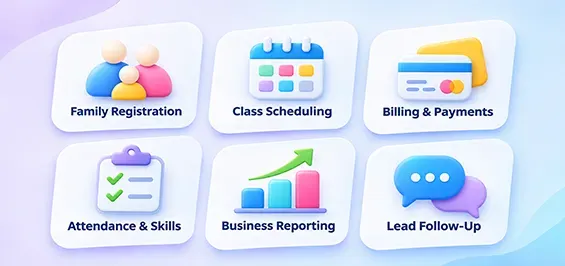
For example, you might start with these six areas.
1. Can Families Find & Register for the Right Class?
Families should be able to find suitable classes and complete routine account tasks without calling the front desk.

Ask providers to demonstrate the process on a phone, from creating an account and adding children to selecting classes, accepting policies, and paying.
- Can families search by age, level, program, or schedule?
- How are full classes and waitlists handled?
- Which enrollments or account changes require staff approval?
- Can families report absences and book eligible makeup classes?
iClassPro's Customer Portal lets families manage accounts, enroll in classes, make payments, and submit requests such as transfers and planned absences. Class filters help parents narrow their options.
2. Does Scheduling Support the Way You Run Your Programs?
Your schedule needs to coordinate students, instructors, class capacity, and changes throughout the season.

Bring a real challenge to the demo, such as a holiday closure, a new beginner class to facilitate waitlisted students, or a group of students moving to another class level.
- Can staff manage recurring classes alongside camps, events, and private lessons?
- How do staff transfer students between classes or levels?
- How are closures and schedule changes handled?
- Can families see current class availability online?
iClassPro's class management software supports class organization, filtering, capacity, pricing, and enrollment types. Waitlist, transfer, drop, and absence requests help teams accommodate regular family interactions.
3. Can Tuition Billing & Payments Work Together?
Staff should be able to calculate tuition, collect payments, and explain an account balance without piecing information together across systems.

Ask each provider to demonstrate your tuition structure, including sibling discounts, midmonth enrollment, prorations, and account credits.
- How are tuition charges calculated and posted?
- What options exist for recurring billing and automatic payments?
- How are discounts, refunds, and credits handled?
- What happens when a payment fails?
Safe and easy payment processing are essential for any children’s activity center. Explore iClassPro's
Autopilot Billing and secure Payment Services.
4. Can Instructors Track Attendance & Student Progress?
Instructors need a practical way to record participation and evaluate skills while keeping families informed.
Ask to see the instructor experience during a typical class.
- Can instructors record attendance from a phone or tablet?
- Can staff see planned absences?
- Can skill categories reflect your curriculum?
- How are evaluations recorded and shared with families?
iClassPro supports custom skill trees and evaluations through the Staff Portal on a phone or tablet. Families can view skill evaluations through the Customer Portal.
5. Will Reporting Help You Make Decisions?
Useful reports should answer questions about enrollment, available spaces, tuition, and program performance.

Choose questions you struggle to answer today, then ask the provider to show the relevant reports.
- Which classes have open spaces or waitlists?
- How are enrollments and program demand changing?
- Which family balances need attention?
- Can staff filter and export the information they need?
Ask which reports are included in the plan being demonstrated and whether advanced analytics cost extra. iClassPro offers built-in reporting and dashboards, with additional analytics available through features like Pro Insights.
6. Can Staff Track Inquiries and Link them to Enrollments?
Some families need a conversation before they’re ready to enroll. Evaluate how staff capture those inquiries and keep follow-up organized.

Ask the provider to follow an inquiry from first contact through enrollment.
- Can staff capture an inquiry without requiring enrollment?
- Can they record conversations, assign follow-up, and update lead status?
- Can you see whether an inquiry becomes an enrollment?
- What reporting connects marketing activity with bookings?
iClassPro’s optional Growth Engine add-on includes CRM-style lead management and marketing journey automation and metrics. This functionality helps staff organize inquiries and understand which marketing activities lead to enrollments.
How Much Does Class Management Software Cost?
Class management software costs vary by provider. Monthly subscription cost is often only a small part of your class management software budget. Understanding the total cost is important to your buying decision.
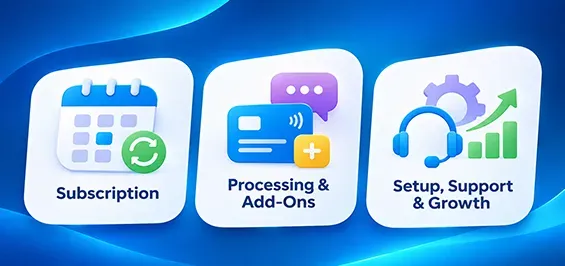
When considering different software vendors, additional costs may include:
- Payment processing and transaction fees.
- SMS usage and optional add-ons or services.
- Setup, migration, and training charges.
- Contract terms and cancellation requirements.
- Costs that change as you grow, like student count, locations, or other usage-based numbers.
Compare estimates for the same required workflows and your team's expected usage. Review your needs today and your future needs as your operations grow.
iClassPro’s subscription plans start from $139 USD per month, per location plus payment processing fees.
Find out more on our pricing page.
Remember to Compare Value Alongside Cost
Estimate how much time your team spends on tasks that could be simplified by your new software. Multiply the estimated hours saved by your hourly labor cost. This will show the value the software adds.
Time freed for other work does not automatically reduce payroll. But it lets you consider how staff could use that time differently to improve your operations.
The best value comes from software that addresses recurring problems and supports consistent workflows.
What Is the Best Class Management Software for Your Industry?
The best class management software fits your programs, tuition policies, staff workflows, and offers the desired family experience.
Use the brief industry guides below to help understand how software might address the needs of your industry. Then compare providers against your specific operations requirements.

Gymnastics Management Software
Look for gymnastics management software that connects recreational classes, team programs, skill evaluations, communications, billing, and family accounts. Include features that support other types of events you offer such as camps, clinics, private lessons, makeup classes, or birthday parties.

Swim School Software
The best swim school management software will help families find age appropriate lessons while keeping scheduling, registration, student-instructor ratios, communications, tuition, and payments organized for your facility. Be sure to ask about custom skill tracking, private lessons, and birthday party features if you offer those services.

Cheer Gym Software
Cheer gym software should support your mix of recreational and competitive cheer needs. Balancing tasks related to team management, practices, regular classes, and private lessons while keeping up with billing and parent communications is a must. Confirm how any extra team or competition-related charges would work. Ask about how summer cheer camps can be managed in the same software space.

Dance Studio Software
Dance studio management software should simplify seasonal enrollment, multiclass tuition, payments, and communication for families with one or more dancers. Evaluate age and level placement, sibling discounts, attendance, and skill evaluations for different disciplines.

Ninja Gym Management Software & Multi-Sport Activity Centers
For ninja gyms, software should match your age groups, skill progressions, enrollment structure, and payment policies. Evaluate recurring classes alongside camps, one-off events, waivers, and any open-gym or pass arrangements you offer.

What You Should Know Before Switching Providers
Before switching class management software, agree on a transition plan for your data, staff, and families. Confirm what will move, what must be rebuilt, who will check it, and when the new system will go live.
- Which family, student, enrollment, and financial records can be imported?
- What history will remain in the old system, and how can you access it?
- Can payment information transfer, or must families enter it again?
- What training and support will be available in your time zone?
- How will your team check balances and enrollment billing before launch?
Get details about responsibilities, fees, and timing in writing. Allow time to verify records, train staff, and explain the new process to families before the first registration or billing cycle.

How to Compare Software Vendor Demos
Include front desk staff and instructors in the evaluation. They may notice practical issues that do not surface from an owner or manager’s perspective.
Use the same scenarios with every provider and record:
- What you saw demonstrated.
- What was described but not demonstrated.
- Where the workflows meet expectations or require extra steps.
- Any questions, costs, or limitations that need clarification.
Mark each discussed scenario as “Meets our needs,” “Needs clarification,” or “Does not meet our needs.” Give your must-have requirements more weight than optional extras.
Finally, compare the scores and observations across providers.
Book a Demo to See How iClassPro Fits Your Activity Center
iClassPro is designed for children’s activity centers that need reliable software to lower administrative workload.
We're trusted by thousands of children's centers worldwide
across several sports and recreational industries. We also attend
industry events and offer
online and human support.
iClassPro is built around how children’s activity centers work.
A parent can enroll two children in different classes and manage payments from one family account. At the center, staff can manage rosters and tuition, while instructors record attendance and evaluate skills using your program’s own progressions. Families can see those evaluations in the Customer Portal.
Pick one workflow from this guide that matters to your team, whether it’s applying a sibling discount, managing a waitlist, or sharing skill progress with parents. In a personalized demo, we’ll walk through how iClassPro handles it so you can compare it with the way you work today.

iClassPro's Winning Formula
We believe iClassPro is the best class management software for gymnastics, cheer, dance, ninja, and swim schools. Why?
We are active in the community. Our CEO and several staff members have real-world experience owning and operating activity centers like the ones we serve. Our team also has a system for collecting real customer feedback to inform our projects. All of which comes together to create unique advantages to our product and service:
- Designed for children’s activity centers. Family accounts are centered around a responsible party (like a parent or guardian) with the ability to add students and other family members.
- Convenient and easy for families to use. Parents can handle registration, payments, and other account tasks through the Customer Portal.
- Connected class and activities operations. Staff can manage enrollment, attendance, skills, billing, and related information all within one platform.
- Built to support student progress. Custom skill trees and student evaluations help instructors track development and share progress with families.
- Features that support good business decisions. Our team regularly adds features, analytics, and workflows inspired by customers to support good business practices and help activity centers reach more families in their community.
- A human support team who cares. We offer both phone and ticket support options 7 days a week. Plus, an online knowledgebase for help articles and an Education Corner for customers with interactive demos and videos covering more complex features.
- More time for work that matters. Helping students grow and discover their potential takes focus. Our software helps simplify the administrative work that competes for your team’s time and attention.
Bring us your class schedule, tuition, policies, and your biggest administrative challenge. Let’s walk through how iClassPro can work for your business!
Pros and Cons, Direct From iClassPro Customers
We invite you to check out our reviews. Find feedback and real customer experiences from businesses like yours on review platforms like Capterra or G2.

FAQs About Class Management Software
What's the Difference Between Class Registration Software and Class Management Software?
Class registration software focuses on sign-ups and enrollment. Class management software typically covers a broader set of ongoing tasks, including scheduling, tuition billing, attendance, communications, and reporting. Product labels vary, so compare the workflows each system actually supports.
Can One Software Really Support All of Your Customer-Facing Activities?
A single platform like iClassPro can support classes, camps, appointments, parties, and other events. But the flexibility of booking and billing can vary greatly by platform. Ask providers that claim to do it all to demonstrate how the activities you offer work.